Synchronous Communication Resiliency Patterns
Introduction

Today I want to talk about reliability and how we can improve the resilience of our systems. Reliability is a vast area, so I’ll be focusing on a specific problem - synchronous communication between systems.
You might know that asynchronous communication is the preferred approach because of the resilience advantages it brings. But inevitably, we still need synchronous communication in our systems - REST APIs or gRPC calls, for example.
Synchronous communication can become problematic when third parties are down, latencies spike, or transient network issues occur - all classic fallacies of distributed computing. In such situations, our systems fail too, and we end up with a broken phone situation (hence the image at the top).
Luckily, there are a few patterns that we can use to make such synchronous integrations more reliable and we will cover those in this post.

Timeouts
Let’s say you need to call another service in one of your use cases. For example, you call the ChatGPT API (most popular integration these days). Typically, this service responds fast within seconds.
But one day this service starts to struggle. Requests take longer to complete - 5 seconds, then 10, then 30 - until you don’t even get a response back. In your UI, end users see a spinner that never stops and requests that never finish. Customers are angry, stakeholders are worried, you are stressed. Not a great situation.
How can we improve this? By configuring timeouts within our HTTP clients.

Timeout configuration lets us specify how long we’ll wait for a request to complete before we cancel it and return an error on our end.
Here is an example using Java HttpRequest where we say that we will give this request 1 second to complete. If it does not complete in 1 second, we will stop waiting and throw an error.
HttpRequest httpRequest = HttpRequest.newBuilder()
  .uri(URI.create("http://10.255.255.1"))
  .timeout(Duration.ofSeconds(1))
  .GET()
  .build();
To choose the right timeout values, we need a baseline - measure how long requests take on average (use percentiles for more accurate statistics). Once we know the norm for that service, we can set a sensible timeout with some buffer on top.
But if the service takes too long, we fail fast. Failing fast means we show an informative error message instead of an endless spinner, and we stop wasting computing resources just waiting around.
But can we do better? Showing an error to the user isn’t great. So yes, we can try - we can retry the request (pun intended).
Retries
If a request fails, we can try it again. But first, we need to check whether a retry makes sense:
- Timeout or transient network issue - yes, retry with the hope it succeeds this time.
- 503 Service Unavailable - yes, retry.
- 400 Bad Request - no. This is a client error, meaning our request is invalid. Retrying with the same payload won’t help.
We also need to think about the type of request we’re retrying. Retrieving data (GET) is safe - fetching data a few times causes no harm. But retrying a request that mutates data (POST/PUT/PATCH/DELETE) requires extra care.
Because of all the potential network issues, if a request fails we can’t be sure exactly when or how it failed. Maybe the downstream service completed the work but failed to send the response back. Maybe it never even received our request. We can’t blindly retry. Imagine you’re sending money - you definitely don’t want to send it twice.
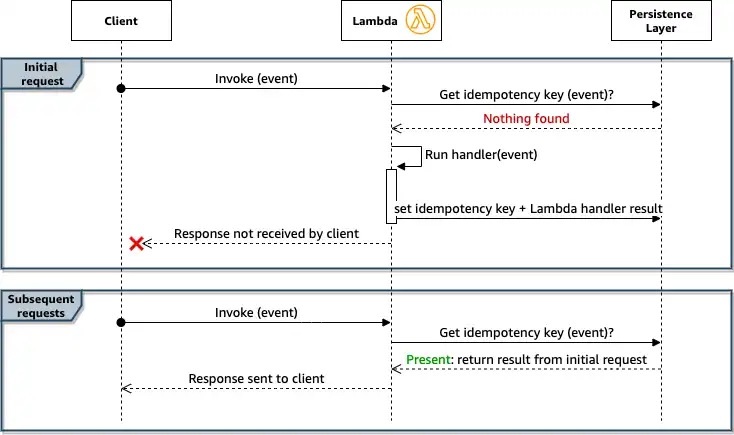
That’s where idempotency comes in. An endpoint is idempotent if it can be safely retried even though it mutates state. Typically, you send an idempotency key alongside your request, and the downstream service checks whether that key has already been processed. If the action hasn’t been performed, it runs. If it was already completed, the service skips it and just returns a success status - basically saying “yep, already did this one”.
Another thing to consider is exponential backoff with jitter in your retry logic. If a service is down, you don’t want to kick someone while they’re down. Give it a small nudge every now and then, with an increasing interval, until you hit the retry limit. Jitter adds randomness to your retries so you don’t send a flood of them at the same moment and overwhelm a service that’s trying to recover.
Luckily, there are libraries that help you implement these patterns. Java has a great Failsafe library where you can define and use retry policies like this:
RetryPolicy<Object> retryPolicy = RetryPolicy.builder()
  .withMaxAttempts(20)
  .withBackoff(Duration.ofMillis(100), Duration.ofMillis(2000))
  .build();
This will delay for 100 milliseconds after the first failure and 2000 milliseconds after the 20th failure, gradually increasing the delay on intervening failures.
But what if the service is still down even after all those nudges? We need to stop kicking it.
Circuit Breaker
The Circuit Breaker is a pattern most of us know from the real world. In electrical terms, a circuit breaker is an automatic safety switch that protects circuits from damage caused by overcurrent, overloads, or short circuits. We can have the same kind of safety mechanism in software.
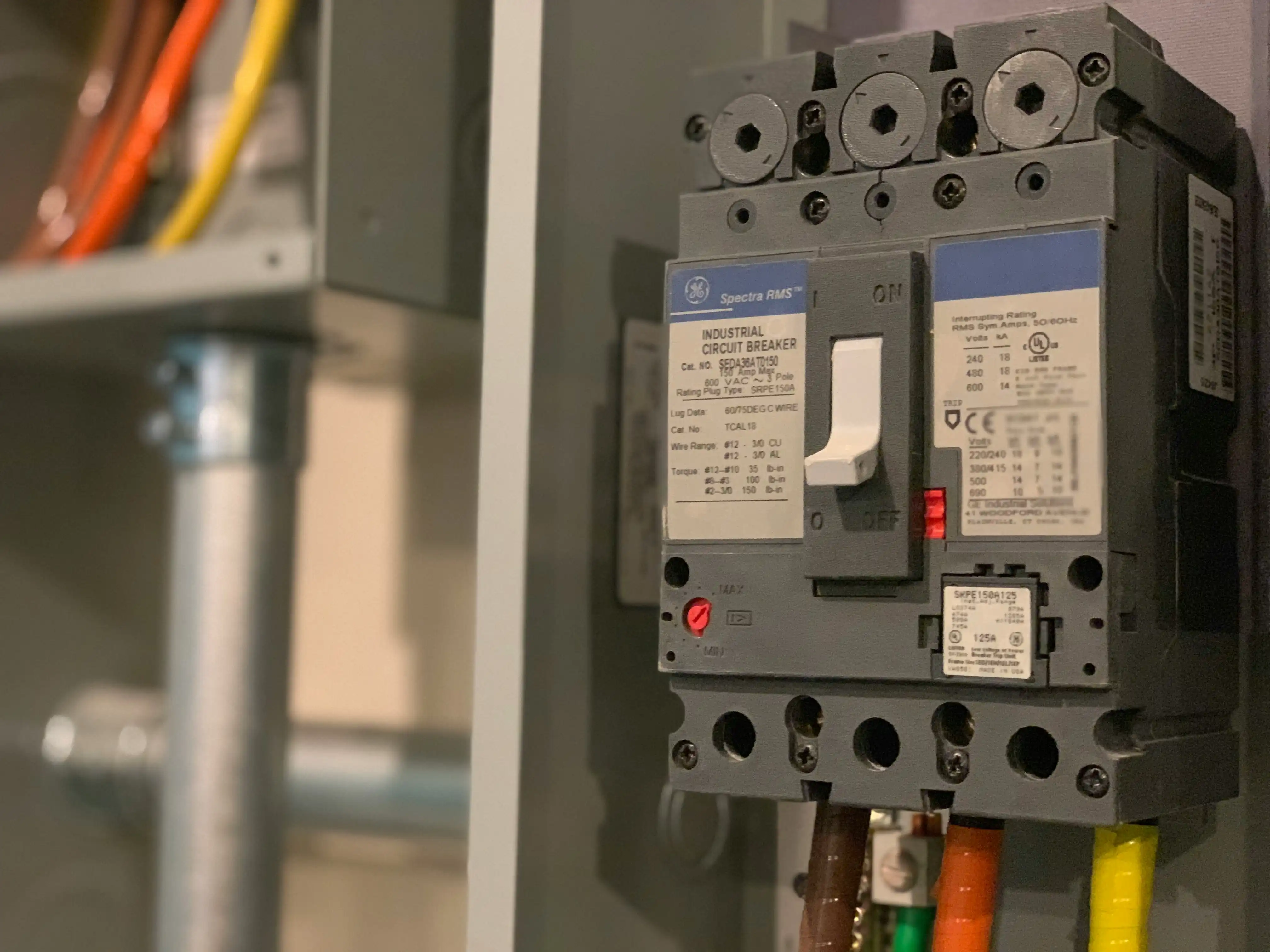
You put a switch between your service and the downstream one. It monitors whether requests are succeeding. If they are not successful beyond a given threshold, it automatically opens the circuit - and any subsequent requests fail immediately, without even reaching that service.
You may wonder why we need this. As mentioned in the retries section, it’s not nice to kick someone while they’re down. In more technical terms, if a service is down or struggling, you will definitely not help it by bombarding it with requests and retries. On top of that, retries waste your computing resources and force end users to stare at a loading spinner for too long. Failing fast is better for everyone.
Failsafe offers circuit breakers as well:
// Opens after 5 failures, half-opens after 1 minute, closes after 2 successes
CircuitBreaker<Object> breaker = CircuitBreaker.builder()
  .handle(ConnectException.class)
  .withFailureThreshold(5)
  .withDelay(Duration.ofMinutes(1))
  .withSuccessThreshold(2)
  .build();
I keep mentioning wasted resources - let me explain why that matters.
Bulkheads
Imagine you have a single bathroom with both a toilet and a shower. If it’s occupied, neither is available. But if they’re in separate rooms, you can use them independently.
The same idea applies to connection and thread pools. If your thread pool is tied up waiting on slow requests to a downstream service - and continuously retrying - it gets exhausted and can’t do any other useful work, like handling requests that don’t need that downstream service at all.
That’s where bulkheading comes in.
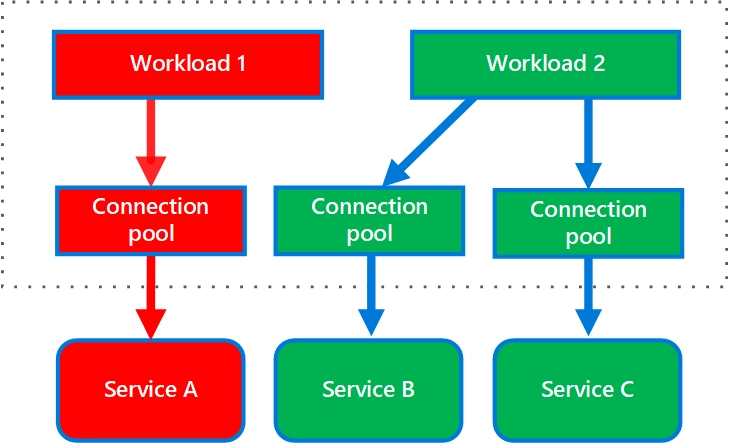
The following diagram shows bulkheads structured around connection pools that call individual services. If Service A fails or causes a problem, the connection pool is isolated, so only workloads that use the thread pool assigned to Service A are affected. Workloads that use Service B and C aren’t affected and can continue working without interruption. - Microsoft 2026
With this pattern, we can have separate pools for different workloads - internal requests, blocking HTTP calls to downstream services, message processing, and so on. Because each pool is isolated, exhausting one doesn’t hurt the others, making our system as a whole more resilient.
Fallbacks
What do you do when a service is down, retries didn’t help, and the circuit breaker is open? Waiting and praying can wait. First, we need to gracefully degrade our system. Every use case and integration needs to be evaluated on its own, but where possible, have meaningful fallbacks ready.
For example:
- Search - returning no results is acceptable.
- Automated action - fall back to manual action performed in the back-office.
- Cached data - return it with a warning that the data may be stale.
Look for ways to make degradation less painful for users. Less stressed customers means less stressed you.
Summary
Integrations will fail. It’s not a question of if, but when. So you need to be prepared. Hopefully these patterns make it into your toolbelt and you find good opportunities to apply them.
If you want to dig deeper into these or other cloud patterns, I’d highly recommend the Azure Architecture Center’s Cloud design patterns section.
Wish you stable and reliable integrations!🔌